Experienced real-time trainers
Learn with trainer-led explanations, demonstrations and guided practice.
Learn to connect apps, data and AI at Nipuna Technologies in Vijayawada. Practise n8n, Make, Zapier, APIs and webhooks through business workflow labs, reviewed projects and an intelligent automation capstone.
Connect each course concept to a practical task, test the result and explain why the approach works.
Exact availability is confirmed for the selected course, Vijayawada branch and current batch.
Learn with trainer-led explanations, demonstrations and guided practice.
Ask the selected branch about recordings available for the current course and batch.
Use the learning platform and batch resources provided for the enrolled programme.
Apply course concepts through the work planned for the selected programme and learner level.
Use structured guidance to compare roles, skills and practical next steps.
Receive resume, interview and job-search support where applicable; employment is not guaranteed.
Map a manual process, connect the right applications, add AI only where it helps and verify the result. The programme covers visual automation, APIs, documents, bounded agents and operations so learners can build dependable workflows rather than isolated tool demonstrations.
Discuss your background and learning goal before choosing a batch.
Build practical automation skills with guided business examples and structured workflow practice.
Connect repeatable processes across leads, CRM, email, support, documents and reports.
Design controlled integrations and improve manual processes with useful evidence of results.
The two new courses have distinct goals. Choose the depth and working style that fit your needs.
Focus on visual workflows, app connections, APIs, webhooks and business processes. Optional scripting is used when a transformation or integration requires it.
Choose the separate Agentic AI course for deeper Python-based agent engineering, stateful orchestration, tool systems and evaluations.
Prompts are one part of the workflow. You also practise validation, permissions, failure handling, monitoring and documentation.
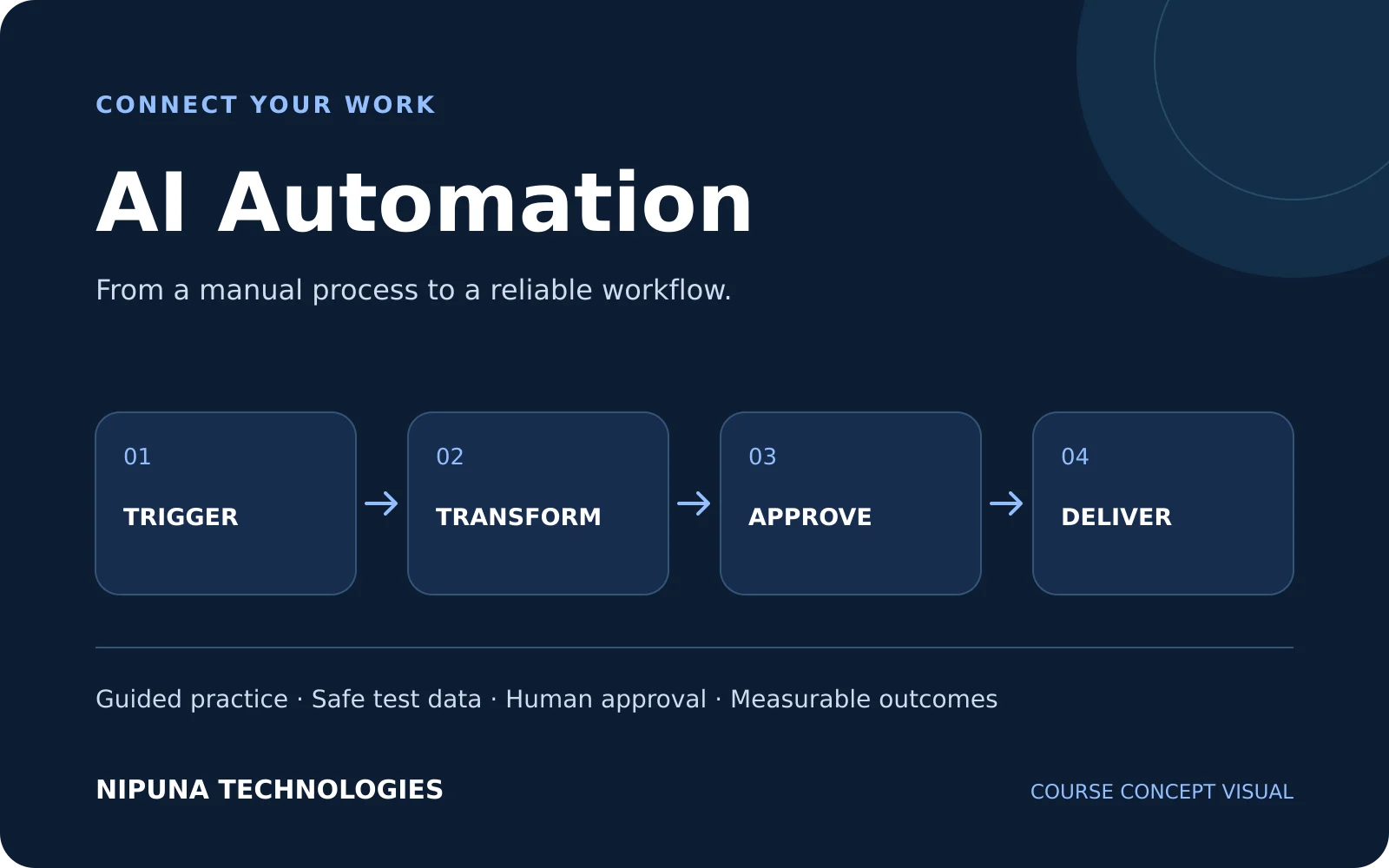
Define the process, inputs, owners and expected outcome.
Integrate applications, APIs, webhooks and AI steps.
Check data, approvals, duplicates and failure paths.
Monitor runs, document changes and improve the workflow.
Exact platforms, libraries, connectors and model providers may vary by trainer and batch. Confirm paid account and API-credit arrangements before enrolment.
Build connected workflows with triggers, data transformation and review steps.
Map app data, apply filters and manage multi-step automation scenarios.
Connect recurring business tasks through supported apps and workflow actions.
Read API documentation, handle authentication and work with paginated responses.
Receive events, validate payloads and handle retries without duplicate actions.
Transform structured records and map fields between business applications.
Inspect requests, test endpoints and debug integration failures.
Use model responses for structured classification, extraction and drafting.
Retrieve relevant documents and ground answers in supporting evidence.
Use bounded agent steps within workflows that retain approval and recovery controls.
Use approved test data, protect credentials, check normal and failure paths, and record execution evidence. The trainer confirms the sequence and practical scope for the current batch.
Build, test and record evidence of the result.
Build, test and record evidence of the result.
Build, test and record evidence of the result.
Build, test and record evidence of the result.
Build, test and record evidence of the result.
Build, test and record evidence of the result.
Project scope is adapted to learner readiness. Keep requirements, tests, limitations, review notes and a demonstration of your contribution.
Capture enquiries, validate details, classify intent, route ownership and create a CRM-ready record.
Classify incoming email, extract actions and prepare response drafts with approval before sending.
Extract structured fields, validate values and route exceptions for review.
Answer from approved business documents with citations, abstention and escalation.
Route requests, retrieve approved guidance, create tasks and escalate uncertain cases to a person.
Generate channel-specific drafts, check brand requirements and collect approval before handoff.
Combine business data into a scheduled, reviewable management summary.
Deliver an end-to-end workflow with integrations, AI, approvals, security, monitoring and a runbook.
Outcomes depend on attendance, practice and completion of assigned work.
Turn a business process into triggers, decisions, actions and measurable outcomes.
Use visual tools, APIs, webhooks and validated structured data.
Apply extraction, classification, grounded answers and bounded agents with human oversight.
Test, monitor, document and recover workflows without hiding failed or duplicate actions.
Portfolio directions include workflow automation, AI integration, no-code automation and automation operations support. Job titles and eligibility depend on employer needs and prior experience. Career assistance does not guarantee employment, salary or placement.
Ask about applicable Nipuna Careers AI/LLM guidance, resume support, interview preparation and portfolio review for your selected branch and batch.
For Vijayawada students and working professionals, the course connects workflow practice with business use cases. Speak with the Vijayawada admissions team about your current skills, preferred timetable and the project scope available in the next batch.
Door No. 40-27-88/1, 3rd Floor, Lohia Towers, KP Nagar, Opposite Nirmala Convent, Vijayawada, Andhra Pradesh 520010
+91 99858 58639
admin@nipunatechnologies.com
Modules can be updated, reordered or disabled from the admin panel.
Identify suitable processes and choose the right level of automation.
Convert a manual process into a clear and testable workflow.
Create reusable instructions for dependable workflow tasks.
Transform AI responses into reliable workflow data.
Build visual automations using triggers, nodes and mapped data.
Create branching, reusable and observable business automations.
Build multi-step scenarios with filters, routers and app modules.
Connect common business applications through guided Zaps.
Connect services that do not have a ready-made automation action.
Handle credentials and transform data safely between systems.
Add language intelligence to controlled workflow steps.
Extract information and answer from approved business content.
Build bounded agents that select approved tools and actions.
Keep people in control of sensitive or consequential operations.
Automate lead handling while preserving accountability.
Apply AI automation across recurring business workflows.
Protect credentials, personal data and connected applications.
Operate workflows with evidence, alerts and recovery paths.
Prepare automations for responsible business use.
Deliver an end-to-end business automation with measurable evidence.
The programme covers process mapping, n8n, Make, Zapier, APIs, webhooks, structured AI outputs, documents, RAG, bounded agents, human approvals, testing and operations.
Basic computer confidence and logical thinking are helpful. Workflow concepts are taught through visual tools. Some integrations and transformations may use small scripts; this is not an advanced software-development programme.
The curriculum includes all three platforms, plus transferable workflow patterns. Exact tool access, connector coverage and practical depth are confirmed for the current trainer and batch.
AI Automation focuses on business workflows and connected applications. Agentic AI goes deeper into code-based agents, orchestration, state, tools and evaluation. Some agent concepts appear here as part of a controlled workflow.
Project briefs cover lead and CRM workflows, email operations, invoice and document processing, knowledge support, customer-support routing, marketing drafts and business reporting.
The course covers authorised application integrations and lead or CRM workflows. WhatsApp integration, when included in a batch, must use supported business APIs and approved accounts; provider access, messaging costs and platform policies still apply.
Applicable Nipuna LMS resources, assignments and class recordings support revision. Confirm access duration, materials and recording availability for your branch and current batch.
The Vijayawada admissions team will confirm the current fee, duration, timetable, trainer and demo availability.
Some connectors, model APIs, cloud hosting and platform plans can incur separate costs. Confirm the accounts and credits supplied for training before paying for external services.
Refer to the location section for the current Vijayawada centre address and Directions link. Classroom, live online and hybrid availability depends on the current batch.
No. Applicable career guidance, portfolio review and placement assistance support preparation. Employment, salary and placement are not guaranteed.
Ask about the current trainer, timetable, mode, fee and demo availability.